
Text to Binary: UTF-8 Examples and ASCII Codes
Text becomes binary when an encoder turns characters into bytes and writes each byte as eight bits. This guide works through ASCII letters, complete words, and UTF-8 text so you can check the conversion yourself.
What is Text to Binary Conversion?
Text to binary conversion writes encoded text as a sequence of 0s and 1s. A byte contains eight bits. An ASCII letter takes one byte; a Unicode code point can take one to four bytes in UTF-8, and a visible character may contain several code points.
ASCII (American Standard Code for Information Interchange) assigns values to 128 characters, including English letters, digits, punctuation, and control codes. This site uses UTF-8, which preserves those ASCII byte values and also encodes other Unicode characters.
How Does Text to Binary Conversion Work?
For an ASCII character, look up its numeric code and write that value in binary. For other text, first encode it as UTF-8, then convert each resulting byte. The steps below use an ASCII letter:
- Identify the ASCII decimal value for each character
- Convert the decimal number to binary using division by 2
- Pad the binary result with leading zeros to make it 8 bits
- Combine all binary bytes with spaces (optional, for readability)
Example: Converting "A" to Binary
Step 1: ASCII code for "A" = 65
Step 2: 65 ÷ 2 = 32 remainder 1
32 ÷ 2 = 16 remainder 0
16 ÷ 2 = 8 remainder 0
8 ÷ 2 = 4 remainder 0
4 ÷ 2 = 2 remainder 0
2 ÷ 2 = 1 remainder 0
1 ÷ 2 = 0 remainder 1
Step 3: Read remainders bottom-up: 1000001
Step 4: Pad to 8 bits: 01000001
Common ASCII Characters in Binary
The table below lists common characters with their decimal ASCII codes and eight-bit binary values. Use it to check individual bytes in the examples.
| Character | ASCII Dec | Hex | Binary |
|---|---|---|---|
| A | 65 | 41 | 01000001 |
| B | 66 | 42 | 01000010 |
| C | 67 | 43 | 01000011 |
| a | 97 | 61 | 01100001 |
| b | 98 | 62 | 01100010 |
| 0 | 48 | 30 | 00110000 |
| 1 | 49 | 31 | 00110001 |
| Space | 32 | 20 | 00100000 |
| ! | 33 | 21 | 00100001 |
| @ | 64 | 40 | 01000000 |
Text to Binary Conversion Examples
Let's look at some practical examples of converting common words and phrases to binary code:
Example 1: "Hello" in Binary
H = 72 = 01001000
e = 101 = 01100101
l = 108 = 01101100
l = 108 = 01101100
o = 111 = 01101111
Result: 01001000 01100101 01101100 01101100 01101111
Example 2: "Binary" in Binary
B = 66 = 01000010
i = 105 = 01101001
n = 110 = 01101110
a = 97 = 01100001
r = 114 = 01110010
y = 121 = 01111001
Result: 01000010 01101001 01101110 01100001 01110010 01111001
Why is Text to Binary Conversion Important?
Understanding text-to-binary conversion has numerous practical applications in modern computing:
- Programming & Development: Low-level programming, debugging, and understanding data structures
- Cybersecurity: Encoding messages, steganography, and encryption techniques
- Networking: Understanding packet structures and data transmission protocols
- Electronics: Working with microcontrollers and digital circuits
- Computer Science Education: Foundation for understanding how computers process information
- Data Recovery: Analyzing raw data and file formats
Common Questions About Text to Binary
Can I convert binary back to text?
Yes! The process is reversible. Simply split the binary string into 8-bit chunks, convert each to decimal (multiply each bit by 2^position), then look up the ASCII character for that decimal value.
Why 8 bits per character?
ASCII needs seven bits to represent its 128 values. When ASCII text is stored in eight-bit bytes, the leading bit is zero. A UTF-8 character outside the ASCII range needs multiple bytes.
What about non-English characters?
ASCII includes English letters, digits, punctuation, and control codes. UTF-8 encodes Unicode code points in one to four bytes, so it can represent accented letters, other writing systems, and emoji. Some visible characters combine more than one code point.
Conclusion
To encode text correctly, choose the character encoding first. ASCII letters keep their familiar byte values in UTF-8; other characters may produce several bytes. Converting those bytes to binary gives a bitstring you can decode with the same encoding.
Use the text to binary converter to check a word from the examples, then try your own text. The conversion runs in your browser.
Check the examples
Technical reference
Related Articles
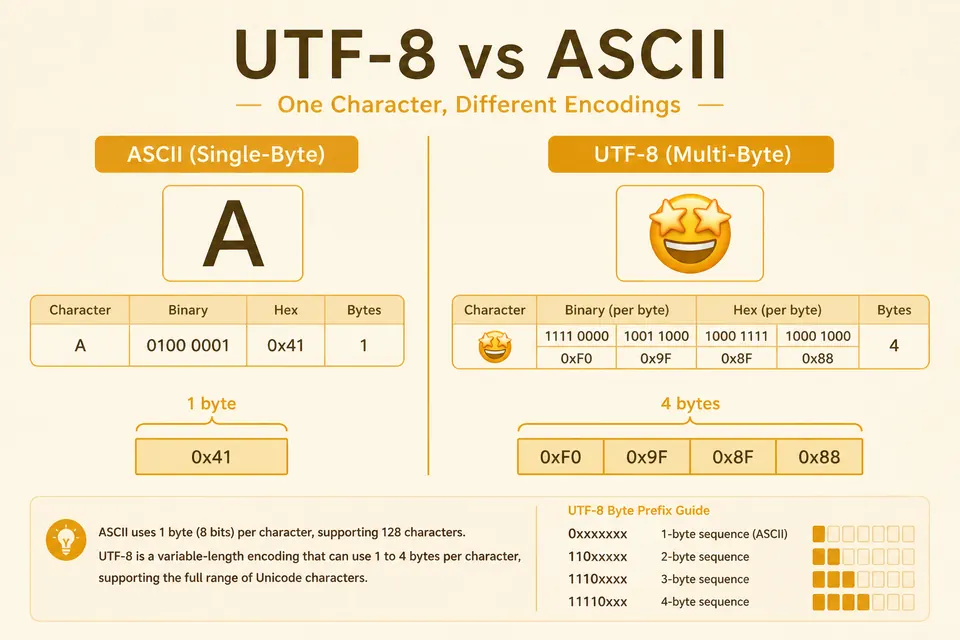
UTF-8 vs ASCII: Byte Counts for Hello, Accents, and Emoji
ASCII fits in one byte. UTF-8 can use one to four. See why emoji and accented text expand the bitstring, with clear examples.

Binary Code Examples: Letters, Numbers, Emoji, and Phrases
Binary code examples you can check byte by byte. Letters, numbers, symbols, emojis, and special characters in binary format.

Complete ASCII to Binary Conversion Table
Look up printable ASCII characters and selected control codes in decimal and binary. Includes examples for reading and converting text.