UTF-8 vs ASCII: Byte Counts for Hello, Accents, and Emoji
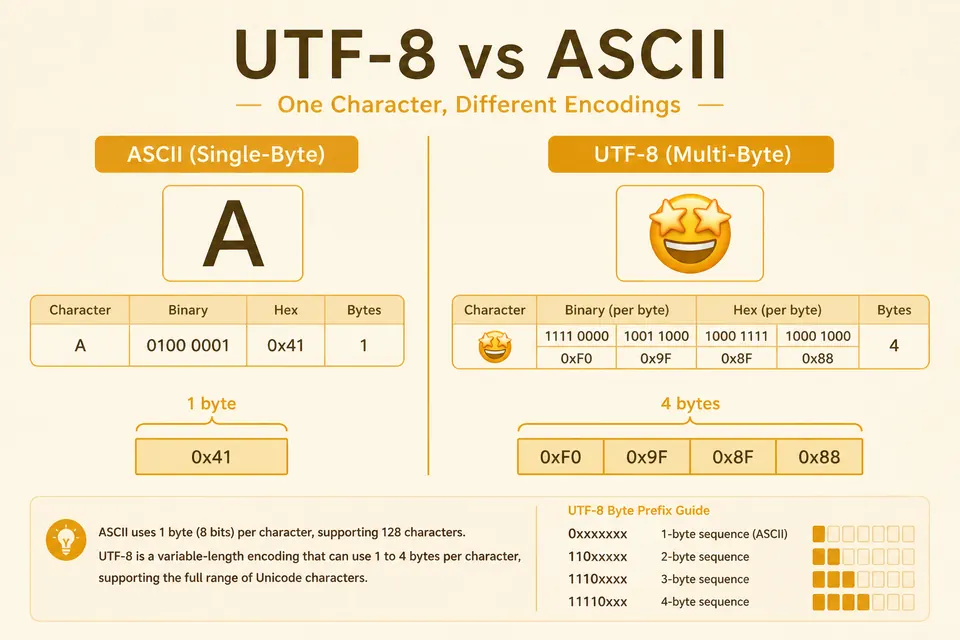
ASCII assigns values to 128 characters. UTF-8 encodes Unicode code points as one to four bytes and preserves ASCII's byte values for those first 128 characters. That means Hello occupies five bytes in either encoding, while an emoji needs more. This guide compares the bytes directly.
ASCII in One Paragraph
ASCII assigns codes 0 to 127 to English letters, digits, punctuation, and control codes such as newline, tab, and null. These seven-bit values are normally stored in eight-bit bytes. The various encodings called extended ASCII use the remaining byte values differently.
Full charts live on the ASCII table page. For conversion drills, text to binary shows the bit pattern for each character as you type.
Unicode Code Points and UTF-8 Bytes
Unicode assigns code points to characters, such as U+0048 for H and U+1F600 for 😀. An encoding defines how those code points are stored as bytes or transmitted over a connection.
UTF-8, UTF-16, and UTF-32 are different packings of the same code points. Browsers, JSON, and most Linux tools default to UTF-8. Windows APIs historically leaned on UTF-16. Confusing the two is a classic source of “mojibake” (garbled text).
UTF-8 Byte Patterns
UTF-8 uses one to four bytes per code point. The leading bits tell you the length:
| Bytes | Bit pattern | Code point range |
|---|---|---|
| 1 | 0xxxxxxx | U+0000-U+007F (ASCII) |
| 2 | 110xxxxx 10xxxxxx | U+0080-U+07FF |
| 3 | 1110xxxx 10xxxxxx 10xxxxxx | U+0800 to U+FFFF, excluding U+D800 to U+DFFF |
| 4 | 11110xxx 10xxxxxx 10xxxxxx 10xxxxxx | U+10000-U+10FFFF |
Continuation bytes always start with 10. That makes UTF-8 self-synchronizing: if you land in the middle of a character, you can scan forward to the next clear start byte.
Worked Example: “Hello”
Every letter in “Hello” sits in the ASCII range, so UTF-8 and ASCII produce identical bytes.
| Char | Code | Hex | Binary |
|---|---|---|---|
| H | 72 | 48 | 01001000 |
| e | 101 | 65 | 01100101 |
| l | 108 | 6C | 01101100 |
| l | 108 | 6C | 01101100 |
| o | 111 | 6F | 01101111 |
01001000 01100101 01101100 01101100 01101111
Paste that into binary to text and you get Hello back. No encoding switch required for this string.
Why Emoji Needs Multiple Bytes
The grinning face emoji 😀 is code point U+1F600. That is above U+FFFF, so UTF-8 uses four bytes. ASCII cannot represent it at all.
UTF-8 for 😀:
F0 9F 98 80
11110000 10011111 10011000 10000000
Count them: four bytes for one visible character. Length APIs that count bytes vs code points vs grapheme clusters will disagree. In JavaScript, '😀'.length is 2 because the engine counts UTF-16 code units, not graphemes. Byte length in UTF-8 is 4.
An ASCII-only encoder cannot represent an emoji. It may report an error or substitute another character. Use a UTF-8-aware path on the text to binary tool.
Accented Letters: Two-Byte UTF-8
The character é (U+00E9) is outside ASCII. In UTF-8 it becomes two bytes: C3 A9, binary 11000011 10101001.
Older Latin-1 (ISO-8859-1) stores é as the single byte E9. Reading UTF-8 bytes C3 A9 as Latin-1 produces é. Reading the Latin-1 byte E9 alone as UTF-8 instead produces a decoding error. Hex dumps make the mismatch obvious; see the hex viewer.
Compatibility: Why UTF-8 Won
Any ASCII byte sequence is also valid UTF-8. Non-ASCII characters may take more than one byte in UTF-8, so byte counts can change when converting from a legacy single-byte encoding. Check the encoding when estimating storage.
UTF-8 uses one byte for ASCII characters. UTF-16 uses two bytes for those characters but can use fewer bytes for some other scripts. JavaScript string length counts UTF-16 code units, which is why it can differ from a UTF-8 byte count.
Byte Length vs Character Length
| String | Visible chars | UTF-8 bytes |
|---|---|---|
| Hello | 5 | 5 |
| café | 4 | 5 |
| 你好 | 2 | 6 |
| 😀 | 1 | 4 |
Database VARCHAR(n) limits sometimes count characters, sometimes bytes, depending on the engine and collation. Measure both when you set column sizes for user-generated text.
Practical Debugging Checklist
- Look at the raw bytes in hex, not just the rendered glyphs.
- If you see
C3before accented letters, you are probably looking at UTF-8. - BOM
EF BB BFat file start means UTF-8 with a byte-order mark (common from Notepad). - Null bytes between ASCII letters often mean UTF-16LE (
H\\0e\\0l\\0l\\0o\\0).
For more conversion walkthroughs, see text to binary guide and binary to text translator.
FAQ
Is UTF-8 a character set?
People say that loosely. Strictly, Unicode is the character set; UTF-8 is an encoding of Unicode code points into bytes. ASCII is both a small character set and (effectively) its own 1-byte encoding.
Can I store UTF-8 in a field labeled “ASCII”?
Only if every character is in the ASCII range, 0 to 127. A field that actually enforces ASCII cannot store ñ or emoji as UTF-8. Check the database or API's encoding contract rather than relying on the field label.
How do I see emoji as binary?
Type the emoji into text to binary. You should get four 8-bit groups for emoji outside the Basic Multilingual Plane like 😀, not a single ASCII code.
Does binary steganography care about UTF-8?
If you hide a message as bytes, encode the message first, then embed those bytes. Mixing ASCII assumptions with UTF-8 payloads corrupts the decode. See binary steganography.
Convert Text the Safe Way
Start with Hello, then try café and 😀. These strings need 5, 5, and 4 UTF-8 bytes respectively. Matching these examples is a useful check, though a complete encoder must also handle the rest of Unicode.
Use Text to Binary on BinaryTranslator.org for instant UTF-8-aware conversion. Flip the result with binary to text, inspect bytes in the hex viewer, or return to the main app for multi-format work.
Check the examples
Technical reference
Related Articles

Text to Binary: UTF-8 Examples and ASCII Codes
Learn how to convert text to binary code with examples, ASCII tables, and step-by-step instructions. Includes ASCII letters, words, and UTF-8 byte counts.

Binary to Text Translator: How It Works (2026)
A binary to text translator turns strings of 0s and 1s into readable characters in seconds. Learn how the conversion works, which encodings matter, and how to pick a fast, private tool.
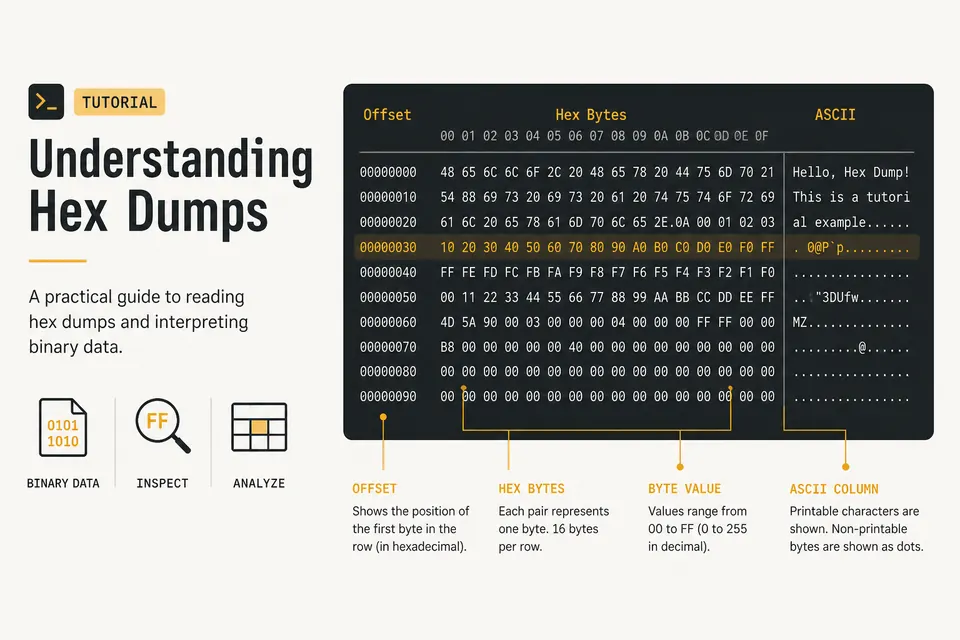
Hex Dump Explained: How to Read a Hex Viewer
Learn what the offset, hex bytes, and ASCII columns mean. Spot PNG magic bytes and inspect files with a private browser hex dump tool.