What Does 01001000 01101001 Mean? Common Binary Phrases
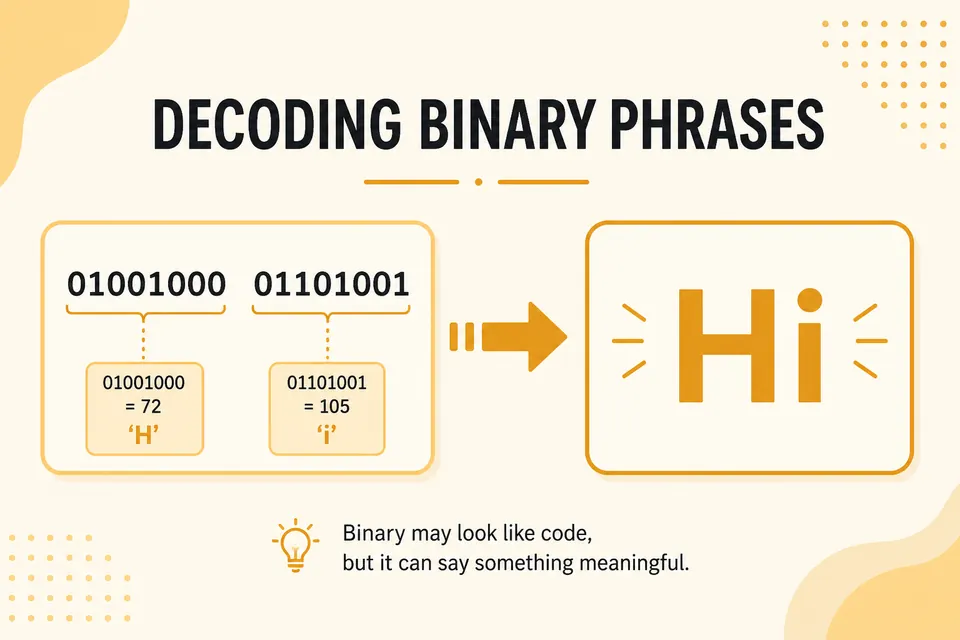
The binary string 01001000 01101001 decodes to Hi in ASCII and UTF-8. Each of these letters occupies one byte. This guide lists several short messages, works through Hello one byte at a time, and explains how to check the spacing.
How to read a binary phrase
- Strip spaces if you want; they are only for humans.
- Split into 8-bit groups (bytes).
- Convert each byte to decimal (powers of 2).
- Map the decimal to an ASCII character.
UTF-8 matches ASCII for English letters, so this works for Hi, Hello, OK, and similar short messages. Emoji and non-Latin scripts need multi-byte sequences. Stick to ASCII for the examples below.
Worked example: "Hi"
Bits: 01001000 01101001
01001000 → 64+8 = 72 → H
01101001 → 64+32+8+1 = 105 → i
Result: Hi
Verify instantly with the binary to text converter. Hand work builds intuition; the tool catches grouping mistakes.
Worked example: "Hello"
H 72 → 01001000
e 101 → 01100101
l 108 → 01101100
l 108 → 01101100
o 111 → 01101111
Full string: 01001000 01100101 01101100 01101100 01101111
Worked example: "OK"
O 79 → 01001111
K 75 → 01001011
Together: 01001111 01001011
Common phrases lookup table
Handy when you are checking homework, CTF-style puzzles, or chat jokes. All values are 8-bit ASCII with spaces between bytes.
| Text | Binary |
|---|---|
| Hi | 01001000 01101001 |
| OK | 01001111 01001011 |
| Yes | 01011001 01100101 01110011 |
| No | 01001110 01101111 |
| Hello | 01001000 01100101 01101100 01101100 01101111 |
| Bye | 01000010 01111001 01100101 |
| Love | 01001100 01101111 01110110 01100101 |
| Help | 01001000 01100101 01101100 01110000 |
| Test | 01010100 01100101 01110011 01110100 |
| Space (single) | 00100000 |
Spaces, case, and punctuation
"Hi" and "hi" are different. Uppercase letters sit in the 65-90 range. Lowercase sits in 97-122. A space is decimal 32 → 00100000.
Exclamation mark is 33 → 00100001. So "OK!" adds one more byte after K. When a string "almost" matches a known phrase, check for a trailing space or punctuation byte.
Why puzzles love these phrases
Short ASCII words are useful practice because each letter takes one byte. Once you recognize a few codes, you can check a message without converting every position from scratch.
For a full character map, open the ASCII table. For the reverse direction (type text, get bits), use text to binary.
Grouping mistakes that break the message
- Starting mid-byte after someone deleted the first few bits
- Assuming 7-bit ASCII without the leading 0 (old teletype habit)
- Treating the whole string as one big binary number instead of bytes
- Mixing hex digits into a "binary" paste (look for A-F)
If the paste has letters A-F, it is probably hex. Run it through the binary converter or hex viewer path instead of forcing a binary decode.
Encode your own phrase
Pick a short word. Look up each letter's decimal code, convert to 8-bit binary, join with spaces. Then decode it again cold. That loop sticks better than reading tables alone.
The main translator on the home page swaps modes in one place if you want binary, hex, and decimal side by side.
FAQ
What does 01001000 01101001 mean?
That is "Hi". 72 and 105 in ASCII. Paste it into binary to text to confirm.
Do I need spaces between bytes?
No. Tools usually accept continuous bitstrings as long as the length is a multiple of 8. Spaces only help you count groups by hand.
Why did my decode look like garbage?
Wrong grouping is the usual cause. Count the bits. If the length is not divisible by 8, a bit was lost or added. Also check that you did not decode hex as binary.
Can binary phrases include emoji?
Yes, but they are multi-byte UTF-8 sequences, not single ASCII bytes. Decode with a UTF-8-aware tool (the site converter uses standard browser encoding) rather than a one-byte ASCII chart.
Decode a string now
Copy any row from the table into the binary to text translator. Then flip to text to binary and encode a phrase of your own. After a few rounds, "Hello" in binary stops looking random.
Check the examples
Technical reference
Related Articles

Complete ASCII to Binary Conversion Table
Look up printable ASCII characters and selected control codes in decimal and binary. Includes examples for reading and converting text.

Binary to Text Translator: How It Works (2026)
A binary to text translator turns strings of 0s and 1s into readable characters in seconds. Learn how the conversion works, which encodings matter, and how to pick a fast, private tool.

Binary Code Examples: Letters, Numbers, Emoji, and Phrases
Binary code examples you can check byte by byte. Letters, numbers, symbols, emojis, and special characters in binary format.